



Frequently Asked Questions

Product Information & Integrations

What is the Qualys Policy Compliance Scanning (Qualys PCS) integration in Nucleus?

The Qualys PCS integration allows Nucleus users to ingest compliance and misconfiguration findings identified by Qualys directly into Nucleus projects, alongside vulnerability data on each asset. This enables organizations to centralize compliance and vulnerability data for a unified risk view. The connector is currently in beta; to enable it, contact Nucleus support or your account representative. Note: The integration is still being fine-tuned and may not be suitable for organizations requiring general availability features. Source

How do you configure and use the Qualys PCS connector in Nucleus?

To configure the Qualys PCS connector, log in to your Nucleus Project, visit the Qualys connector setup screen, add the API Gateway URL for your Qualys instance, and save the connection. To ingest a PC Policy, navigate to the Import via Connector page, select 'Import by PC Policy', choose your policy, and save. Once ingested, compliance findings are visible on the Compliance Active Findings page. Note: The connector is in beta and may require additional support for optimal performance. Source

What integrations does Nucleus support?

Nucleus integrates with over 160 tools across ITSM (Jira), CWPP (Microsoft), DAST (Qualys, Tenable), SCA (Alienvault USM), Containers (AWS EC2, Prisma, Palo Alto Networks), SAST (Github), CSPM (Wiz, Orca), Pen Testing (Synack, HackerOne), EDR (CrowdStrike), OT (Nozomi), and ASM (SecurityScorecard, Censys). For a complete list, visit Nucleus Integrations. Note: Some integrations may require additional configuration or licensing. Source

Does Nucleus offer an API for custom integrations and reporting?

Yes, Nucleus provides an API that enables users to interact with the Nucleus Database for custom dashboards, real-time reporting, and integration with third-party tools such as SIEM and SOAR. API documentation is available at Nucleus API Docs. Note: API usage may require technical expertise and proper authentication. Source

Features & Capabilities

What are the key features and benefits of the Nucleus platform?

Nucleus offers vulnerability aggregation, risk-based prioritization, automation of remediation workflows, compliance framework support, POA&M automation, cloud and application security integration, asset management, and threat intelligence enrichment. Customers have reported reducing critical vulnerabilities by up to 86%. Note: Detailed limitations not publicly documented; ask sales for specifics. Source

How does Nucleus automate compliance and vulnerability management workflows?

Nucleus automates workflows by associating compliance and vulnerability findings on the same asset, enabling prioritization based on asset context. The platform supports dynamic asset grouping and user/team management, and leverages automation rules such as Dynamic Fields for asset processing. Note: Automation effectiveness may depend on proper configuration and organizational processes. Source

What performance improvements and outcomes have customers reported with Nucleus?

Customers have reported measurable outcomes, such as reducing critical vulnerabilities by up to 86%. The platform is designed for faster performance, increased resiliency, and efficient processing of vulnerability data. Enhanced reporting and customizable dashboards allow real-time tracking of metrics. Note: Performance may vary based on environment and integration complexity. Source

Security & Compliance

What security and compliance certifications does Nucleus hold?

Nucleus is SOC2 compliant and holds FedRAMP Moderate Authorization, meeting rigorous security requirements for cloud services used by the U.S. Federal Government. These certifications demonstrate adherence to controls relevant to security, availability, processing integrity, confidentiality, and privacy. Note: Certification scope may not cover all use cases; verify with sales for specific requirements. Source

How does Nucleus support compliance frameworks and regulatory requirements?

Nucleus automates compliance framework controls and requirements, supporting standards such as NIST, FedRAMP, CISA, and PCI DSS Requirement 6. The platform simplifies adherence by centralizing compliance data and automating reporting. Note: Compliance automation may require proper configuration and ongoing updates to regulatory standards. Source

Implementation & Support

How long does it take to implement Nucleus, and what resources are available for onboarding?

Nucleus integrates with over 200 tools out of the box, enabling onboarding in hours instead of weeks. Prebuilt connectors and reusable templates simplify deployment. Customers have access to step-by-step guides, video tutorials, a dedicated support portal, and Customer Success Managers for implementation and troubleshooting. Note: Implementation time may vary based on organizational complexity and integration requirements. Source

What technical documentation and support resources does Nucleus provide?

Nucleus offers API documentation, FlexConnect Framework setup guides, a help and support portal, and quickstart onboarding guides. These resources are available at API Docs, FlexConnect Framework, and Support Portal. Note: Some documentation may require registration or access permissions. Source

Use Cases & Customer Proof

What types of organizations and roles benefit from using Nucleus?

Nucleus is designed for Security Analysts, Development and IT Teams, CISOs and Security Leadership, GRC and Compliance Teams, and Managed Security Service Providers (MSSPs). It is used by organizations in regulated industries (healthcare, finance, government), large enterprises, public sector entities, and service providers. Note: Smaller organizations or those with limited integration needs may require a tailored approach. Source

What industries are represented in Nucleus case studies?

Industries include banking and financial services, airlines, healthcare, cybersecurity services, education, energy and utilities, retail and consumer goods, public sector, and technology. For more details, visit Customer Stories. Note: Case studies may not represent all possible industries or use cases. Source

Can you share specific customer success stories using Nucleus?

Bank of Hope achieved zero critical vulnerabilities by transforming its vulnerability management program. A Tier-1 airline reduced 86% of critical vulnerabilities. A healthcare enterprise replaced Kenna with Nucleus, reducing its backlog from 4,000 vulnerabilities to nine critical threats. Orange Cyberdefense streamlined vulnerability management and drove higher customer engagement. For more, visit Customer Stories. Note: Results may vary by organization and implementation. Source

Pain Points & Problems Solved

What common pain points does Nucleus address?

Nucleus addresses vulnerability aggregation across multiple tools, risk prioritization beyond scanner severity scores, manual remediation workflow inefficiencies, compliance challenges, POA&M management for public sector, exposure management across hybrid cloud environments, and integration of production risk context into application security. Note: Some pain points may require additional customization or process changes. Source

What core problems does Nucleus solve for organizations?

Nucleus consolidates vulnerability data, prioritizes risks using asset context and threat intelligence, automates remediation workflows, simplifies compliance framework alignment, automates POA&M compliance, scales exposure management, integrates application security, and manages cloud vulnerability and exposure. Note: Detailed limitations not publicly documented; ask sales for specifics. Source

Customer Experience & Feedback

What feedback have customers provided about the ease of use of Nucleus?

Customers report that Nucleus is easy to use, with intuitive automation and a smooth onboarding process. Reviews highlight immediate value, streamlined workflows, and responsive support. For example, a healthcare security manager described onboarding as "one of the best implementations" and a SOC Operations Manager noted "automation is very easy to navigate." Note: User experience may vary based on team size and technical expertise. Source

Business Impact & ROI

What business impact can customers expect from using Nucleus?

Customers can expect improved operational efficiency, enhanced security outcomes, cost savings, compliance support, centralized visibility, proven ROI (up to 86% reduction in critical vulnerabilities), faster remediation, and increased customer engagement. For example, Orange Cyberdefense saw 85% of customers using the platform weekly. Note: Business impact depends on implementation and organizational context. Source

Release Spotlight: Qualys PCS

nucleussec2024
January 11, 2024
Product
Qualys PCS Nucleus Connector

In the culinary world, the adage “too many cooks spoil the broth” warns of the chaos and disarray that can arise from too many opinions and actions in the kitchen. However, this concept takes an intriguing twist in the realm of cybersecurity. Think of vulnerability management and policy compliance as two master chefs, each bringing their unique flavors and expertise to create a cybersecurity ‘broth’ that is robust and exquisitely balanced despite being created by multiple opinions and actions in the same cybersecurity ‘kitchen.’  

We’re proud to announce an exciting integration with Qualys Policy Compliance Scanning (Qualys PCS). This integration allows us to ingest compliance and misconfiguration findings identified by Qualys directly into Nucleus projects, alongside vulnerability data on each asset. Just as a well-seasoned broth benefits from the right balance of ingredients, a balanced blend of policy compliance and vulnerability management enhances the overall security posture of your organization, enabling you to navigate risks associated with vulnerabilities and misconfigurations.
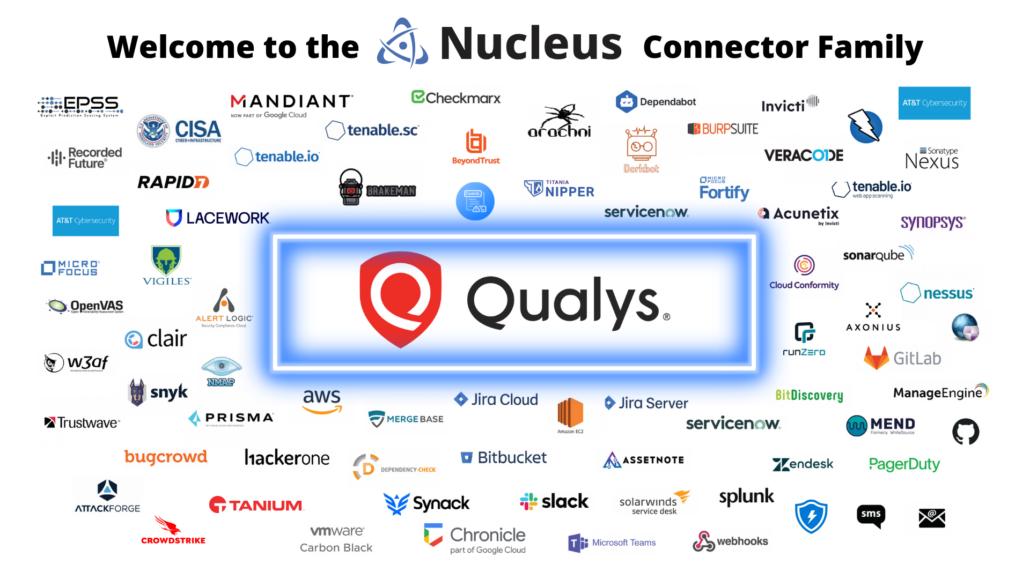
Qualys PCS Nucleus Connector

What is Qualys Policy Compliance Scanning (Qualys PCS)?   

Qualys PCS is a comprehensive solution that streamlines the process of ensuring your IT environment complies with internal policies and external regulatory standards. It provides an in-depth assessment of where your IT assets stand regarding compliance with a wide range of global security mandates, such as PCI DSS, HIPAA, NIST, and many others. The platform automates compliance data collection across your network, eliminating manual data gathering and reducing the risk of human error. By centralizing this information, Qualys PCS offers a clear, unified view of your compliance posture, making it easier to identify and address gaps in compliance.

One of the key strengths of Qualys PCS is its robust customization capabilities, which allow for creating specific compliance checks that cater directly to the unique aspects of your organization’s IT infrastructure. These tailored solutions enable businesses to go beyond generic compliance guidelines, focusing on specific areas of concern or unique operational environments. Whether it’s adhering to industry-specific regulations, corporate policies, or unique security protocols, Qualys PCS’s customizable checks ensure that every aspect of your compliance need is covered comprehensively and accurately. This targeted approach enhances the overall compliance strategy and provides a more precise and relevant assessment of your organization’s security and compliance posture.

Why Combine Policy Compliance with Vulnerability Management?  

Combining compliance and vulnerability management data into the same tool may seem unnecessary. Different teams may own KPIs in each area, for example, and often, different teams are responsible for fixing compliance findings versus vulnerability findings. However, when you zoom out a bit, both compliance and vulnerability scanning are intended to accomplish the same thing: find risk in your organization. For teams who are interested in a comprehensive understanding of their overall risk picture, it is not only sensible but indeed necessary to bring both datasets together.  

Thanks to the flexibility of Nucleus’ data model and its powerful automation engine, we can associate compliance and vulnerability findings on the same asset in our platform. Furthermore, layering in each organization’s unique asset context makes it easy to combine all the relevant data points into a representation of organizational risk broken down by asset. With powerful user and team management capabilities and infinitely configurable asset grouping options, it’s also possible to understand risk through any relevant organizational lens. Nucleus makes it simple to prioritize the most significant impact fixes that will help reduce the overall risk of an asset or group of assets, whether based on a compliance policy, vulnerability remediation, or some combination of the two.   

Put it to use

The Qualys PCS connector is in beta release, signifying that we’re still fine-tuning its features for optimal performance. If you want to explore its capabilities within your Nucleus organization, please get in touch with support or your dedicated account representative. Once enabled for your organization, ingesting Qualys policy compliance scans is straightforward in two easy steps:  

Step 1 – Configure your Qualys Connector for PCS  

Login to your Nucleus Project. Visit the Qualys connector setup screen. Add the API Gateway URL for your Qualys instance and hit Save Connection.
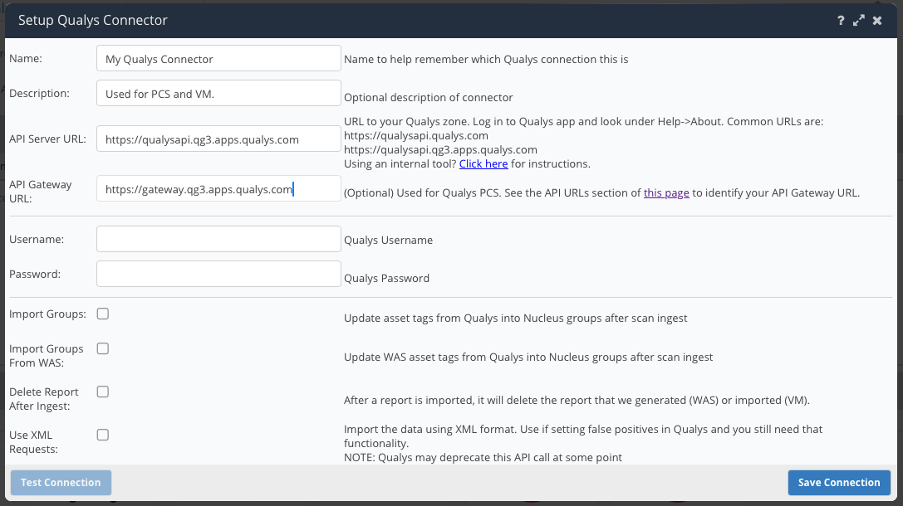
Qualys Connector Setup in Nucleus

Step 2 – Ingest a PC Policy  

Navigate to your Qualys connector in the Import via Connector page. Select Import by PC Policy. Choose your policy, then continue, and select Save & Finish. Congrats! You’ve now started ingesting your first PC policy.
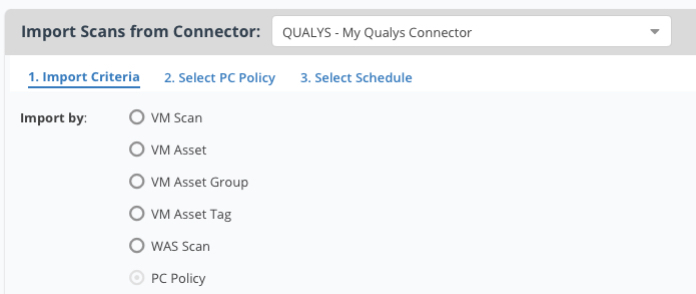

Qualys Connector Import Criteria in Nucleus
PC Policy Selection in Nucleus

Once you have successfully ingested your policy compliance scan into Nucleus, browse the Compliance Active Findings page to see all compliance checks that passed and all misconfigurations on assets across your organization.
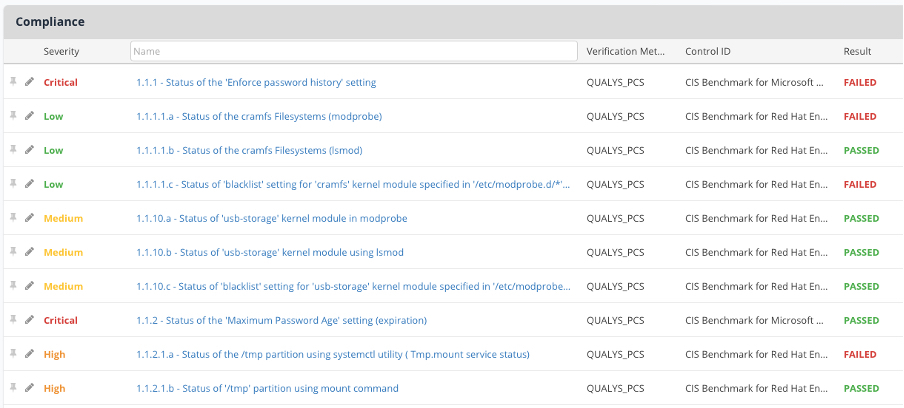
Compliance Active Findings in Nucleus

Workflow Automation

Getting lots of data into a platform is great, but the more data you get, the harder it is to do anything without robust automation tooling to make use of it.  

The Qualys PCS connector intelligently ingests vast amounts of useful Qualys and cloud provider metadata on assets, which you can use in Nucleus’ powerful automation engine. Leveraging Asset Processing rules with Dynamic Fields, you can set up asset groups that will stay current as the underlying metadata changes.
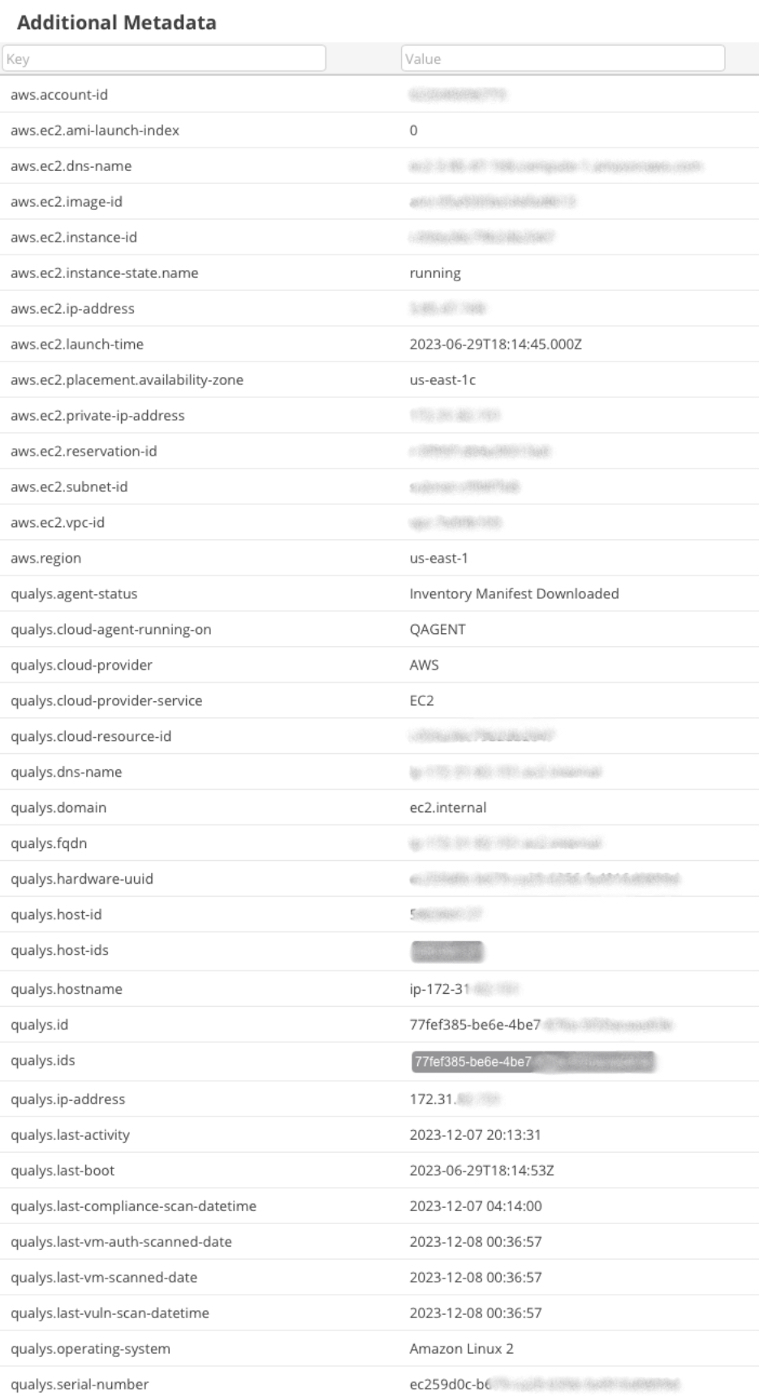
Additional Metadata on Assets in Nucleus

For the first time in our Qualys connector, we now also ingest all of the tags an asset has as separate keys. This new capability can be powerful for customers using Qualys’s parent-child tag functionality to represent key/value pairs, such as departments, teams, and more.
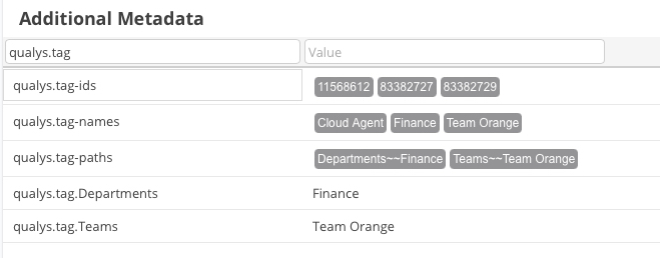
Qualys Asset Tags in Nucleus

Look Ahead

We’re excited to see how Nucleus customers use the Qualys PCS connector within our platform. Throughout the next quarter, we will closely monitor the connector for how it performs at scale and work with our customers to incorporate their feedback before transitioning it to general availability. We also have some exciting improvements to the Qualys VM connector coming soon, so stay tuned for future announcements!  

nucleussec2024

See Nucleus in Action

Discover how unified, risk-based automation can transform your vulnerability management.