




Frequently Asked Questions

Product Information

What is Nucleus and what does it do?

Nucleus is a unified vulnerability management platform that aggregates data from your existing security tools, providing a centralized command center for vulnerability analysis, triage, and remediation. It automates workflows, prioritizes risks using real-world intelligence, and helps organizations align with compliance frameworks. Watch the Nucleus Overview Video. Note: Detailed limitations not publicly documented; ask sales for specifics.

What products and services does Nucleus offer?

Nucleus offers the Vulnerability Intelligence Platform (VIP), Nucleus Insights (AI-powered intelligence feed), and MCP Server for advanced data interaction. Solutions include Exposure Management, Risk-Based Vulnerability Management, Application Security, Cloud Vulnerability & Exposure Management, and tailored offerings for Federal Government and State/Local/Education (SLED). Partner programs and a comprehensive resource library are also available. See the Platform page. Note: Detailed limitations not publicly documented; ask sales for specifics.

Features & Capabilities

What are the key features and capabilities of Nucleus?

Nucleus consolidates vulnerability data from multiple tools, prioritizes risks using asset context and threat intelligence, automates remediation workflows, simplifies compliance with frameworks like NIST, FedRAMP, and CISA, automates POA&M compliance, integrates production risk context into application security, and manages exposures across hybrid cloud environments. Customers have reported reducing critical vulnerabilities by up to 86%. Note: Best fit for organizations needing centralized vulnerability management; teams requiring deep custom integrations may want to confirm compatibility with sales.

Does Nucleus support nested asset groups?

Yes, Nucleus supports nested asset groups, allowing organizations to create a hierarchy of assets and automate workflows so newly discovered assets are added to the appropriate groups. Connector imports can pull in nesting from tools like Checkmarx, Qualys, AWS, and Rumble. Note: Nested asset group functionality depends on connector compatibility; verify with sales for specific tool support.

Can Nucleus integrate with external ticketing systems?

Nucleus enables direct interaction with external ticketing systems such as Jira, ServiceNow, and Zendesk from within the platform. Users can create tickets, add comments, and sync updates in real-time for coordinated workflows. Note: Integration depth may vary by ticketing system; check the integrations page for details.

What integrations are available with Nucleus?

Nucleus integrates with over 160 tools, including Jira (ITSM), Microsoft (CWPP), Qualys and Tenable (DAST), Alienvault USM (SCA), AWS EC2, Prisma, Palo Alto Networks (Containers), Github (SAST), Wiz and Orca (CSPM), Synack and HackerOne (Pen Testing), CrowdStrike (EDR), Nozomi (OT), SecurityScorecard and Censys (ASM), and Zendesk (ticketing). For a complete list, visit the integrations page. Note: Some integrations may require additional configuration or licensing.

Does Nucleus offer an API?

Yes, Nucleus provides an API for interacting with the Nucleus Database, enabling custom dashboards and reports, integration with third-party tools (SIEM, SOAR), and real-time updates. API key service accounts can be created and managed within the console. See API deployment page and API documentation. Note: API usage may require technical expertise and proper permissions.

Technical Requirements & Documentation

Where can I find technical documentation for Nucleus?

Technical documentation is available for the API (API docs), FlexConnect Framework (FlexConnect docs), and onboarding guides (Quickstart). The Support Portal provides comprehensive guides, FAQs, and troubleshooting resources. Note: Some documentation may require login or partner access.

Implementation & Support

How long does it take to implement Nucleus and how easy is it to start?

Nucleus integrates with over 200 tools out of the box, enabling onboarding in hours instead of weeks. Prebuilt connectors and reusable templates simplify deployment. Customers have access to step-by-step guides, video tutorials, and a dedicated Support Portal. Customer Success Managers and a responsive technical support team assist with implementation and troubleshooting. Note: Implementation speed may vary based on environment complexity and integration requirements.

What support resources are available for Nucleus customers?

Standard product support is included at no additional cost, with access to a dedicated support portal and responsive technical support. Customer Success Managers assist with onboarding and ongoing support. Note: Advanced support options may be available for enterprise customers; inquire for details.

Security & Compliance

What security and compliance certifications does Nucleus have?

Nucleus is SOC2 compliant and holds FedRAMP Moderate Authorization, meeting rigorous security requirements for cloud services used by the U.S. Federal Government. These certifications demonstrate adherence to controls relevant to security, availability, processing integrity, confidentiality, and privacy. Note: For organizations requiring additional certifications, contact sales for specifics.

How does Nucleus protect customer data?

Nucleus employs industry-standard administrative, physical, and technical safeguards to protect the security, confidentiality, and integrity of customer data. Compliance warranties under the Master Service Agreement cover adherence to applicable laws and regulations, including breach notification laws. Note: For detailed data protection policies, refer to the Master Service Agreement or contact support.

Does Nucleus have a vulnerability disclosure program?

Yes, Nucleus encourages responsible security research and welcomes disclosure of potential vulnerabilities. Researchers are protected from legal action if they follow program guidelines. See Vulnerability Disclosure Program. Note: Disclosure guidelines must be followed for legal protection.

Performance & Customer Feedback

What performance improvements and outcomes have customers reported with Nucleus?

Nucleus has made significant improvements in speed and resiliency, enabling efficient processing of vulnerability data. Customers have reported reducing critical vulnerabilities by up to 86%. Orange Cyberdefense saw 85% of its customers using Nucleus weekly to reduce exposure to threats. Note: Performance may vary based on deployment scale and integration complexity.

What feedback have customers provided about ease of use?

Customers have described Nucleus as easy to use, with intuitive automation and a smooth onboarding process. Reviews highlight the platform's user-friendly design and immediate value in streamlining vulnerability management. For example, a Security Architect in IT Services noted that Nucleus replaced their old tool and streamlined processes. Note: User experience may vary based on organization size and technical expertise.

Use Cases & Target Audience

Who is the target audience for Nucleus?

Nucleus is designed for Security Analysts, Development and IT Teams, CISOs and Security Leadership, GRC and Compliance Teams, and Managed Security Service Providers (MSSPs). It is best suited for organizations in regulated industries (healthcare, finance, government), large enterprises, and public sector entities. Note: Smaller organizations may want to confirm fit with sales.

What industries are represented in Nucleus case studies?

Industries include Banking and Financial Services (Bank of Hope), Airlines (Tier-1 airline), Healthcare (Delta Dental, Abbott), Cybersecurity Services (Orange Cyberdefense), Education (UCSB, Udemy), Energy and Utilities (NRECA), Retail and Consumer Goods (JCPenney, Henkel, Constellation Brands), Public Sector (DOE, Australian Red Cross), and Technology (Autodesk, CISCO, Motorola, Zebra). See Customer Stories page. Note: Case studies may not cover all industry scenarios.

Can you share specific customer success stories?

Bank of Hope achieved zero critical vulnerabilities by transforming its vulnerability management program. A Tier-1 airline reduced 86% of critical vulnerabilities. Orange Cyberdefense streamlined vulnerability management and drove higher customer engagement. UCSB transformed its risk management approach. NRECA achieved centralized risk visibility and action. See Customer Stories page for more. Note: Results may vary by organization and implementation.

Pain Points & Problems Solved

What problems does Nucleus solve for its customers?

Nucleus addresses vulnerability aggregation, risk prioritization, manual remediation workflows, compliance challenges, POA&M management, exposure management across large enterprises and hybrid cloud environments, application security integration, and cloud vulnerability management. Note: Organizations with highly specialized workflows may need to confirm fit with sales.

Business Impact & ROI

What business impact can customers expect from using Nucleus?

Customers can expect improved operational efficiency, enhanced security outcomes, cost savings, simplified compliance, centralized visibility, proven ROI (up to 86% reduction in critical vulnerabilities), faster remediation, and increased customer engagement. Note: Impact depends on organizational adoption and integration depth.

Nucleus Release 2020-11-10

We’re pleased to bring you a new release of Nucleus with several enhancements and customer requests added! Take a look at some of the highlights.
Adam Dudley
November 11, 2020
Product
Nucleus Release Announcement

.

We’re pleased to bring you a new release of Nucleus with several enhancements and customer requests added! Let’s take a look at some of the highlights.

Nested Asset Groups
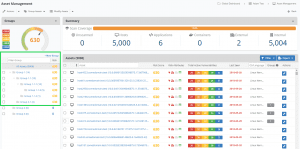
Nucleus Nested Asset Groups

Nucleus now supports nested asset groups. Nested asset groups are a flexible way to create a hierarchy of all the assets across your entire organization. Organize your assets however you like and set up workflows so that newly discovered assets automatically get added to the groups you want.


Tickets View
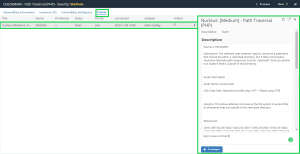
Nucleus Tickets View

We’ve added a Tickets view to the Vulnerability Details window. Whether you use Jira, ServiceNow, Zendesk, etc., now you can create tickets and interact with these platforms all from within the context of a specific finding and all the instances of that finding in Nucleus without having to go to another page or logging in to your ticketing tool.


Zendesk Connector
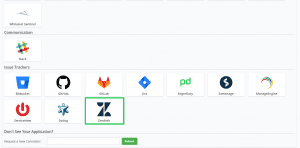
Nucleus Zendesk Connector

True to our Integration Support Commitment, when customers ask, we deliver! This month we’re pleased to announce we’ve added Zendesk to our growing list of over 70 integrations.


The Full List of Updates from 2020.09.22

  • NEW Nested asset groups, so you can now create and preserve a hierarchy of all your assets across your entire enterprise
    • We also modified connector imports to pull in nesting from various tools, such as Checkmarx, Qualys, AWS, and Rumble
  • NEW Import Custom Asset attribute fields from ServiceNow CMDB
    • Set up asset sync to pull in custom fields from ServiceNow
    • Use the ServiceNow fields in Nucleus automation rules for grouping, ticketing, and asset ingest from ServiceNow.
  • NEW Ticketing page where you can interact with external ticketing systems directly from within Nucleus
    • Use Case: Create a ticket in Jira, Zendesk, or ServiceNow from Nucleus, then add comments directly on that comment from within Nucleus in real-time for a more coordinated and efficient workflow.
  • NEW Zendesk Support ticketing connector – Added support for creating and syncing back tickets in realtime with Nucleus
  • Checkmarx connector update
    • Support v9 of Checkmarx
    • Import based on Team, not just based on project name
    • Added additional filters to the project-based import
  • Rapid7 connector – host and tag-based import
    • Now import data from Rapid7 via Asset group or asset tag, in addition to Site
  • Prisma Cloud Connector update – Project-based import in addition to container image-based import
  • Sonatype Connector Updates
  • New Dependabot Connector – transition from an API which was being deprecated to a new API
  • Netsparker connector updates – Added additional information from scan results
  • API key service accounts can now be created (and permissions managed) within the Nucleus console
  • Automatically email a user when a vulnerability has been assigned to them in Nucleus.
  • API updates – Allow users to create & update asset information into nested groups
  • Automation rule updates – allow for nested asset group use in current automation rules
  • Various bug fixes, speed enhancements, and UI enhancements.
Adam Dudley
Adam is VP of Strategy and Alliances at Nucleus Security, working closely with the company's partners and integrations. Adam is also proudly the company's longest-tenured non-founding employee.

See Nucleus in Action

Discover how unified, risk-based automation can transform your vulnerability management.