













Nucleus Release 2021-1-19
We’re pleased to bring you a new release of Nucleus with several enhancements and customer requests added! Take a look at some of the highlights.
.
A new year, a new release of Nucleus! We hope everyone had a great break and a happy new year and are as excited as we are to see what 2021 brings. It can’t get worse than 2020, right?
The first release of this year is packed full of goodies – it has something for everyone. We’re also trying a new format for our release notes. See below to find out more!
Container Images & Application Branches
The asset management and asset details pages have had a face-lift, bringing with it specialized views for some of our asset types, and clearer visibility of container instances and images:
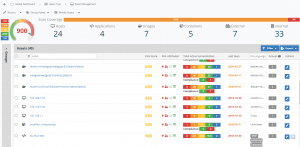
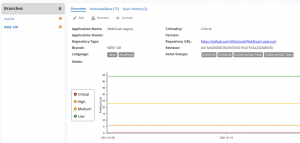
If you’re ingesting container images with tag data or source code repositories with branch information, Nucleus now intelligently matches container images from the same repository and branches from the same application so that you can easily swap between them:
Additional Metadata
In addition to Additional Metadata being front and center in our new asset details page, we’ve started ingesting and populating this section of our assets with the scan/tool metadata from each available source. We’ve adopted a standard dot style naming convention so that you’re always aware of where the metadata came from:
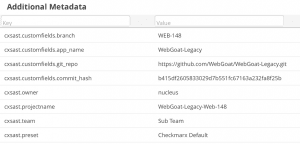
Coupled with an update to our Asset Processing rules in a previous release which allows you to trigger a rule based on the value in Additional Metadata, you can increasingly build more and more powerful automations for your Nucleus projects.
This release includes additional metadata from Checkmarx, Veracode, Rapid7 InsightVM, and Microsoft Defender for Endpoint. We’ll also slowly be updating our other connectors over the coming months to include more metadata from them too.
Connector Changes
Microsoft Defender for Endpoint
In this release, we’re introducing support for Microsoft Defender for Endpoint (previously known as Microsoft Defender ATP). This connector has been one of the most requested integrations to date, so true to our word of building for our customers, we’ve built a connector that integrates with the Threat and Vulnerability Management module to ingest identified CVE’s into Nucleus in an automated way.
Checkmarx & Veracode
Shifting left means getting feedback as early as possible in the development lifecycle, and for many, that means scanning code as soon as it’s branched. Now that Nucleus makes it easier to view the different branches of applications, we’ve updated two of our most used connectors to also be branch aware.
By using custom fields that are set up in these tools, you can now import the application name, branch, git repository URL, and commit the hash of a scan directly into Nucleus. If you’re using Checkmarx, you can also optionally set a delimiter in the connector setup. This means that you can pull the branch name directly out of the project name.
We’ve also updated these connectors to give you even more flexibility with how you create asset groups. Now when assets are imported from these scanning tools, you have the option to create unique asset groups, create groups that match with imports from other apps, or do nothing at all!
Vulnerability ingestion for Veracode has also improved as we’re now matching each vulnerability’s status to its corresponding counterpart in Nucleus.
Rapid7 InsightVM
Similar to Checkmarx and Veracode, we’ve also updated our Rapid7 InsightVM connector to give you more metadata and more choices when importing assets. Not only do you have the same asset group import options as Checkmarx and Veracode, but we are also ingesting all criticality, owner, location, and custom tags as additional metadata that you can use when creating automation rules.
Data Ingestion Troubleshooting
Sometimes even though we have the best of intentions, things just don’t go the way we planned, and we’re left to pick up the pieces and figure out what went wrong. In this release, we’ve made it easier to be notified and investigate when a connector ingestion job didn’t complete successfully.
In the newly renamed Data Ingest section (previously known as Scans), you can now view all connector activity for a specific project including a log of previous jobs and any upcoming jobs.
We’ve also made it possible to be notified when scan ingestion fails. Navigating to Project Administration > Edit Project Info will allow you to set an email address for daily or weekly digest emails to be sent to when a scan fails. These emails will only be sent if a scan ingests fails!
Speed Optimization
This release comes with some optimizations that make Nucleus even faster than it already is. Page loads should be up to 100% faster across the application.
Complete list of changes and bug fixes
-
NEW We now have a Microsoft Defender for Endpoint connector integration.
-
NEW The Asset Details pages for Container Images and Code Repositories now give you the option to view other tags and branches and navigate between them.
-
NEW The Asset Details page has a new overall design, incorporating Additional Metadata in the Overview tab.
-
NEW You can now specify a custom date range on the Vulnerability Trends page, enabling you to get the exact insights that you want for the dates that you’re interested in.
-
NEW The Checkmarx and Veracode connectors are now code repository and branch aware. You can optionally ingest branch names and other git metadata via custom fields, or if you’re using Checkmarx, by setting a delimiter to split the project name by. E.g. Setting the delimiter to – will result in my_application-branch_name being imported as my_application, with the branch set to branch_name.
-
NEW The Checkmarx, Veracode, and Rapid7 InsightVM / Nexpose connectors now ingest additional metadata.
-
NEW We’ve brought Connector Activity to the project level. You can find it in the Data Ingest section.
-
NEW You can now be alerted daily or weekly when connector jobs fail, or scan ingestion issues occur (including uploaded via API). Configure this via Edit Project.
-
NEW Scheduling reports is more flexible: you can now schedule reports to run every x number of days, each week on a specific day, every month on the xth day of the month, or every month on the first, second, third, or fourth weekday of the month (e.g. third Tuesday).
-
UPDATE The Asset Management section was updated to distinctly show Container Images (“Images”) and Container Instances (“Containers”), as well as simplify the top bar.
-
UPDATE Knowing where you are in the app and moving backward should now be even easier. We’ve relocated the breadcrumb bar, and added a handy back button so you can easily go to the previous page.
-
UPDATE The Amazon EC2, Bit Discovery, Rapid7 InsightVM, Veracode, Rumble, and ServiceNow connectors now give you the option to:
-
Import as unique nested asset groups
-
Import to existing nested asset groups (or groups that have the same name in other tools)
-
Not import to asset groups at all.
-
-
import tags as Nucleus groups that are unique, or that auto-correlate to groups with the same name from other tools.
-
UPDATE Scans was renamed to Data Ingest.
-
UPDATE The Vulnerability Details Excel report now includes an Operating System column.
-
UPDATE We’ve updated the Sonatype NexusIQ connector to recognize false positives, as well as to only import licenses that are marked as failed.
-
UPDATE We’ve updated the Prisma Cloud connector to match container images based on repositories, rather than repository and tag.
-
UPDATE We’ve updated the Qualys WAS connector to render recommended links as HTML links.
-
UPDATE The user activity log now shows when a user account was disabled.
-
UPDATE Nucleus is faster.
-
UPDATE We’ve updated the feedback and help links to direct you to our new support portal and help center.
-
BUGFIX We’ve fixed a bug with asset processing rules not always working with slashes.
-
BUGFIX We’ve fixed a bug where supported weak ciphers reported in Netsparker were not properly importing into Nucleus.
-
BUGFIX We’ve fixed an issue where the API was not returning an error message when a host id was provided from a different project.

See Nucleus in Action
Discover how unified, risk-based automation can transform your vulnerability management.