What automation features does Nucleus offer for vulnerability management?
Nucleus provides an Automation Engine that enables users to create vulnerability processing rules with multiple actions, such as setting due dates, assigning vulnerabilities to users, changing status, altering severity (with reasoning), commenting, and marking exploitability based on criteria like threat intelligence scores. Dynamic Fields allow rules to use asset metadata for flexible, scalable automation. Note: While automation is extensive, highly custom workflows may require additional configuration. Source
How does Nucleus aggregate and prioritize vulnerabilities?
Nucleus consolidates vulnerability, threat, and asset data from over 200 integrated tools into a single platform. It uses asset context and real-world threat intelligence to prioritize vulnerabilities, ensuring organizations focus on the most critical risks. Note: Effectiveness depends on the quality and breadth of integrated data sources. Source
What integrations are available with Nucleus?
Nucleus integrates with over 160 tools, including Jira (ITSM), Microsoft (CWPP), Qualys and Tenable (DAST), Alienvault USM (SCA), AWS EC2 and Prisma (Containers), Github (SAST), Wiz and Orca (CSPM), Synack and HackerOne (Pen Testing), CrowdStrike (EDR), Nozomi (OT), and SecurityScorecard and Censys (ASM). For a full list, visit the integrations page. Note: Some integrations may require additional setup or licensing from third-party vendors.
Does Nucleus provide an API for custom integrations and reporting?
Yes, Nucleus offers an API that allows users to interact with the Nucleus Database for building custom dashboards, extracting metrics, and integrating with SIEM, SOAR, and other security tools. Real-time updates are supported. API documentation is available at api-docs.nucleussec.com. Note: API usage may require technical expertise. Source
What reporting and dashboard capabilities does Nucleus offer?
Nucleus provides customizable dashboards and reports, allowing users to track performance metrics and reveal trends in real-time. Reports can be scheduled and edited based on user feedback. Note: Custom report creation may require familiarity with the platform's reporting tools. Source
Use Cases & Benefits
What problems does Nucleus solve for organizations?
Nucleus addresses challenges such as scattered vulnerability data, ineffective risk prioritization, manual and error-prone remediation workflows, complex compliance requirements, and the need for scalable exposure management across hybrid cloud environments. It automates aggregation, prioritization, remediation, and compliance tasks. Note: Organizations with highly unique workflows may require additional customization. Source
Who can benefit from using Nucleus?
Nucleus is designed for Security Analysts, Development and IT Teams, CISOs and Security Leadership, and GRC/Compliance Teams. It is suitable for large enterprises, regulated industries (healthcare, finance, government), MSSPs, and public sector entities. Note: Smaller organizations with limited security resources may find the platform's breadth more than they require. Source
What business impact have customers reported from using Nucleus?
Customers have reported reducing critical vulnerabilities by up to 86%, improved operational efficiency, cost savings, enhanced compliance, and faster remediation. For example, a Tier-1 airline reduced 86% of its critical vulnerabilities, and Bank of Hope achieved zero critical vulnerabilities after adopting Nucleus. Note: Results may vary based on organizational maturity and implementation scope. Customer Stories
Which industries are represented in Nucleus customer case studies?
Industries include banking and financial services, airlines, healthcare, cybersecurity services, education, energy and utilities, retail and consumer goods, public sector, and technology. Notable customers include Autodesk, Cisco, Delta Dental, UCSB, Department of Energy, and American Airlines. Note: Industry-specific requirements may necessitate additional configuration. Source
Technical Requirements & Implementation
How long does it take to implement Nucleus and how easy is it to start?
Nucleus integrates with over 200 tools out of the box, enabling onboarding in hours instead of weeks. Prebuilt connectors and reusable templates simplify deployment. Step-by-step guides, video tutorials, and a dedicated support portal are available. Note: Highly customized environments may require additional setup time. Quickstart Guide
What technical documentation is available for Nucleus?
Technical resources include full API documentation (api-docs.nucleussec.com), FlexConnect Framework setup guides, a comprehensive help and support portal (help.nucleussec.com), and onboarding quickstart guides. Note: Some advanced documentation may require registration or support access. Source
Security & Compliance
What security and compliance certifications does Nucleus have?
Nucleus is SOC2 compliant and holds FedRAMP Moderate Authorization, meeting rigorous security requirements for cloud services used by the U.S. Federal Government. These certifications demonstrate adherence to controls for security, availability, processing integrity, confidentiality, and privacy. Note: Additional certifications may be required for certain regulated industries. Source
How does Nucleus protect customer data?
Nucleus employs industry-standard administrative, physical, and technical safeguards to protect the security, confidentiality, and integrity of customer data. The company warrants compliance with all applicable laws and regulations, including breach notification laws, under its Master Service Agreement. Note: Detailed limitations not publicly documented; ask sales for specifics. Source
Does Nucleus have a vulnerability disclosure program?
Yes, Nucleus encourages responsible security research and welcomes disclosure of potential vulnerabilities. Researchers are protected from legal action if they follow the program's guidelines. Note: Details of the program are available on the Vulnerability Disclosure Program page.
Support & Implementation
What support resources are available to Nucleus customers?
Standard product support is included at no additional cost, with access to a dedicated support portal and responsive technical support. Customers also benefit from Customer Success Managers for implementation and troubleshooting. Note: Premium support tiers or SLAs may require additional agreements. Support Portal
What feedback have customers given about the ease of use of Nucleus?
Customers have described Nucleus as easy to use, with a smooth onboarding process and intuitive automation features. For example, a Manager of Security Architecture in Healthcare stated, "After purchasing, they offered one of the best onboarding/implementations I’ve worked with, and the product is easy to use." Note: Some advanced features may require additional training. Source
We’re pleased to bring you yet another new release of Nucleus with enhancements and new features! Take a look at some of the highlights.
Adam Dudley
April 29, 2021
Company
.
Let’s paint a picture. It’s a bright sunny day in Florida and the Nucleus Ninja is out walking his Ninja-dog, Ninken, next to the local alligator pond. This gives the Nucleus Ninja a chance to clear his head and think about our customers, and that’s when it hits him, the dawning realization that may just be the answer to “how to do automation in the context of vulnerability management”.
The Nucleus Ninja and his ninja dog, Ninken
This release is all about how to start doing automation of vulnerability management at scale. We announced our push towards better automation in our first Quarterly Customer Webinar, and this release is all around going down that path. We’ve designed a brand new workflow, introduced a templating language, and updated a lot of areas to make Nucleus just that much better around automating workflows. And without further ado, here’s what we’ve been up to the past month…
Actions in Vulnerability Processing Rules
Last release we announced Vulnerability Processing Rules, a new feature in the Nucleus Automation Engine that makes it easy and efficient to set due dates on vulnerabilities in line with the security policies in your organization. At the time, we promised more functionality coming soon to help you automate as much of the vulnerability analysis and tracking process as possible.
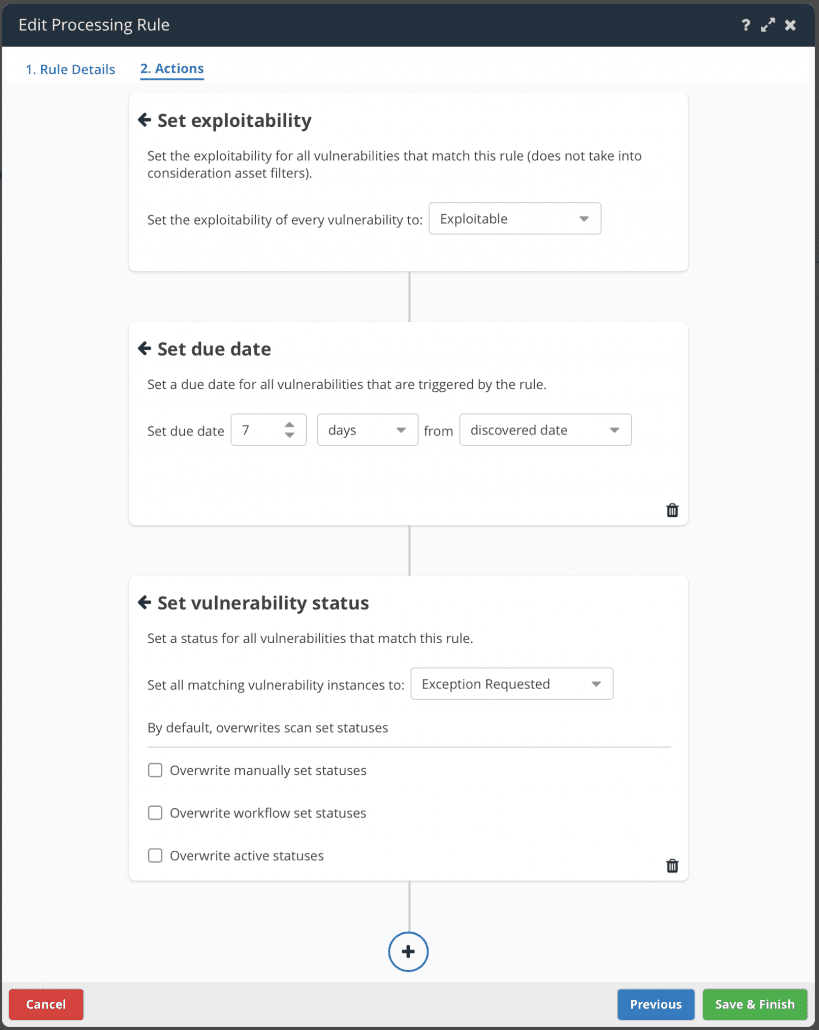
Today we’re excited to announce an extension to these rules using our new “ninja-approved” Action Card view. Now, in vulnerability processing rules you can not only trigger actions on more flexible data criteria, but you can also choose between a wider set of actions to perform on vulnerabilities when they are ingested into Nucleus. All actions can be filtered to only apply to subsets of assets for maximum flexibility and scalability in your automation ruleset.
Some of the new actions available include:
Setting the due date of a vulnerability
Assigning a vulnerability to a user
Changing a vulnerability instance status (e.g. if you want to always mark a vulnerability as False Positive or Risk Accepted under certain circumstances, such as all low severity vulnerabilities on non-prod systems)
Setting a different severity on a vulnerability with a spot to populate the reasoning why the vulnerability severity was altered (for those pesky audits)
Commenting on a vulnerability
Setting whether or not the vulnerability is exploitable (you want to automatically mark a vulnerability as exploitable when Recorded Future score is above a 90? We got you.)
But wait…
What’s even more exciting is that you can do all of the above actions in one rule. Simply create a new rule, choose the vulnerability and asset criteria, and add action cards to your heart’s content! We think that this can be particularly useful for actions that are specific to your organization, such as changing the vulnerability’s severity, assigning it to a user and adding an explainer comment all in one go, completely automatically as new vulnerability data comes into Nucleus.
Dynamic Fields/Templating Language
This was the “Eureka” moment that allowed the Nucleus Ninja to come to the simple following conclusion
“If I could just use asset fields dynamically in automation rules, I could have one rule to… rule them all!”
Well, it’s time to get back to your computer and fire up your browser, because Nucleus has got you covered! Introducing Dynamic Fields, a templating language for the Nucleus Automation Engine (and soon to be app-wide, or world-wide, depending on how you look at it).
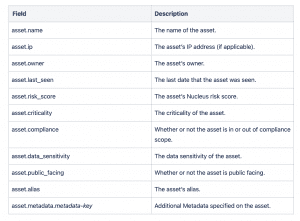
Dynamic Fields allow you to construct asset and/or vulnerability processing rules that dynamically include information from the assets that the automation rules match during execution of the rule. For example, let’s say you want to automatically assign a vulnerability to a user based on the asset owner. That is now totally possible! Say goodbye to multiple rules for every possible value of a custom metadata field. You can create ONE rule to undertake multiple actions and dynamic values based on other attributes from elsewhere in Nucleus.
In this release, you can use asset fields dynamically in vulnerability processing rules when commenting on a vulnerability or assigning the vulnerability to a user, and in asset processing rules when adding an asset to an asset group or setting the asset owner.
Here is a complete list of the asset fields that you can use dynamically in these automation rules:
More Additional Metadata!
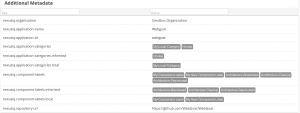
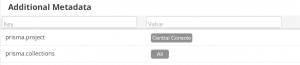
We didn’t stop there! Since you can use custom metadata from your extended asset record in Nucleus, we’re now always continuing to update existing connectors to include more additional metadata so you can use the data for better automation and reporting. In this release we’ve made updates to the Sonatype NexusIQ and Prisma Cloud connectors:
Sonatype NexusIQ
Prisma Cloud
As always, you can use all of the above metadata in the Nucleus Automation Engine to make more and more powerful automations in your Nucleus Projects.
Complete list of changes and bug fixes…
NEW The latest CSV export AlertLogic scan output is now supported by Nucleus the in which three field names changed.
NEW You can now use asset fields dynamically in automation rules.
NEW Vulnerability processing rules now support multiple actions in one rule.
NEW Asset processing rules now support setting the asset owner.
UPDATE We’ve adopted a standard naming convention for tickets and issues in Nucleus. We now refer to all external issues as Tickets across Nucleus.
UPDATE You can now trigger automation rules using the vulnerability source tool.
UPDATE Updated the Welcome to Nucleus email to direct to the new Help Center.
UPDATE Sped up the initial load of the vulnerability trends page.
UPDATE The Sonatype NexusIQ connector now ingests additional metadata for assets.
UPDATE The Prisma Cloud connector now ingests additional metadata for assets.
UPDATE The SonarCloud and SonarQube connectors have been updated to not need administrator permissions in certain situations.
UPDATE Operating System information ingested from Microsoft Defender for Endpoint now takes precedence over the same information that has been ingested from unauthenticated Tenable scans.
UPDATE The report scheduler has been updated based on user feedback to make it easier to edit previously scheduled reports.
UPDATE Added software export information to the Assessments module report
BUG FIX Scan dates in some locations in the UI were not being correctly adjusted to reflect local timezones.
BUG FIX Veracode was not importing the latest scan in certain circumstances
BUG FIX Zendesk was not pulling ticket status back to Nucleus in certain situations.
Adam Dudley
Adam is VP of Strategy and Alliances at Nucleus Security, working closely with the company's partners and integrations. Adam is also proudly the company's longest-tenured non-founding employee.
See Nucleus in Action
Discover how unified, risk-based automation can transform your vulnerability management.